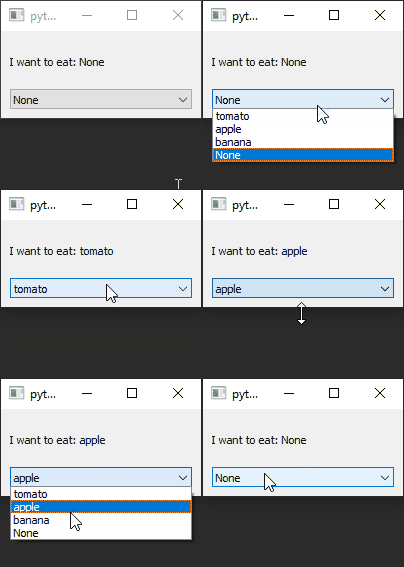
RQChoice and RQCombobox
example code
import sys
from PyQt5.QtWidgets import QApplication, QMainWindow, QVBoxLayout, QWidget
from pyreaqtive.models import RQChoice, RQList, RQModel, RQComputedText
from pyreaqtive.widgets import RQComboBox, RQLabel
from enum import Enum, auto


class Food:
    # Declare a class to use with the choice if using rqlist

    def __init__(self, name: str):
        self.name = name

    def __str__(self):
        # When rendering the object, return it's name by default
        return self.name


class FoodEnum(Enum):
    tomato = auto()
    apple = auto()
    banana = auto()

    def __str__(self):
        return self.name


class MainWindow(QMainWindow):
    def __init__(self):
        super().__init__()
        widget = QWidget()
        layout = QVBoxLayout()
        widget.setLayout(layout)
        self.setCentralWidget(widget)

        # Declare a list of available choices

        # This List can be a reactive RQList
        choices = RQList([
            Food("tomato"),
            Food("apple"),
            Food("banana")
        ])

        # Or a regular list
        choices = [
            "tomato",
            "apple",
            "banana"
        ]

        # Or use enum
        choices = FoodEnum

        # Declare a Choices model
        choice = RQChoice(
            choices=choices,
            selected=None,  # Start as none choice
            allow_none=True  # Allow none choice
        )

        # Display current choice
        label = RQLabel(RQComputedText(
            "I want to eat: {food}",
            food=choice
        ))
        layout.addWidget(label)

        # RQCombobox to select the choice
        combobox = RQComboBox(choice)
        layout.addWidget(combobox)


app = QApplication(sys.argv)
window = MainWindow()
window.show()
app.exec()