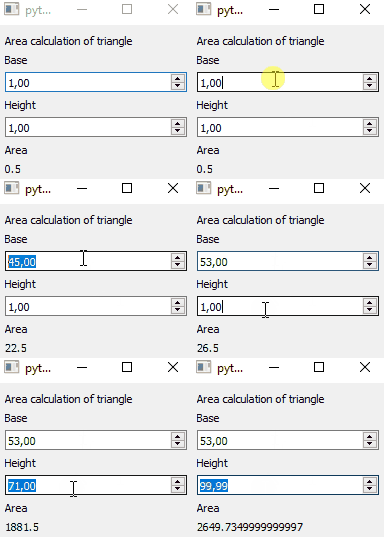
RQComputedFloat
example code
import sys
from PyQt5.QtWidgets import QApplication, QMainWindow, QVBoxLayout, QWidget, QLabel
from pyreaqtive.models import RQFloat, RQComputedFloat
from pyreaqtive.widgets import RQDoubleSpinBox, RQLabel


class MainWindow(QMainWindow):
    def __init__(self):
        super().__init__()
        widget = QWidget()
        layout = QVBoxLayout()
        widget.setLayout(layout)
        self.setCentralWidget(widget)

        layout.addWidget(QLabel("Area calculation of triangle"))

        base = RQFloat(1)
        height = RQFloat(1)

        layout.addWidget(QLabel("Base"))
        base_spinbox = RQDoubleSpinBox(base)
        layout.addWidget(base_spinbox)

        layout.addWidget(QLabel("Height"))
        height_spinbox = RQDoubleSpinBox(height)
        layout.addWidget(height_spinbox)

        # Function can also be declared inplace on the widget
        area = RQComputedFloat(
            lambda b, h: b * h / 2,
            b=base,
            h=height
        )

        layout.addWidget(QLabel("Area"))
        area_label = RQLabel(area)
        layout.addWidget(area_label)

        # Trying to connect a widget that modifies values, to computed models (they are read_only) throws an IOError
        try:
            area_widget = RQDoubleSpinBox(area)
        except IOError:
            print("io exception")


app = QApplication(sys.argv)
window = MainWindow()
window.show()
app.exec()