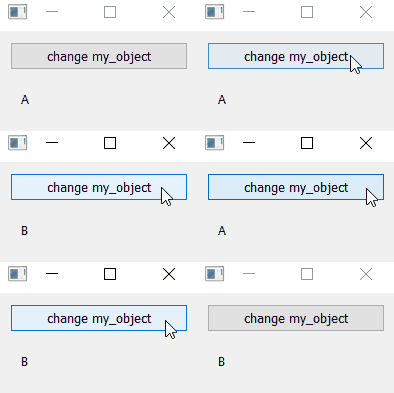
RQObject and RQWidgetObject
example code
import sys

from PyQt5.QtWidgets import QApplication, QMainWindow, QVBoxLayout, QWidget, QPushButton, QHBoxLayout, QLabel

from pyreaqtive.models import RQObject
from pyreaqtive.widgets import RQWidgetObject


# Declare two types of objects
class TypeA:
    attribute_a = 'hello'


class TypeB:
    attribute_b = 'goodbye'


# Declare two different widgets to represent each type
class WidgetA(QWidget):

    def __init__(self):
        super(WidgetA, self).__init__()
        self.main_layout = QHBoxLayout(self)
        self.main_layout.addWidget(QLabel("A"))


class WidgetB(QWidget):

    def __init__(self):
        super(WidgetB, self).__init__()
        self.main_layout = QHBoxLayout(self)
        self.main_layout.addWidget(QLabel("B"))


class MainWindow(QMainWindow):
    def __init__(self):
        super().__init__()
        widget = QWidget()
        layout = QVBoxLayout()
        widget.setLayout(layout)
        self.setCentralWidget(widget)

        # Declare a instance for each type
        self.object_a = TypeA()
        self.object_b = TypeB()

        # Declare a RQObject that points to either object_a or object_b
        self.object_to_display = RQObject(self.object_a)

        # When the button is pressed the object_a is replaced by object_b and vice versa
        change_button = QPushButton("change my_object")
        change_button.clicked.connect(self.toggle_object_to_display)
        layout.addWidget(change_button)

        # Create a widget, linked to a layout that will display the corresponding widget
        widget = RQWidgetObject(
            self.object_to_display,  # Pointer to the widget
            layout,  # Indicate in which layout the widgets must be in. (Will always be in the same position)
            widget=self.choose_widget  # Callback for the creation of the widgets for each object change
        )

    def choose_widget(self, obj):
        if isinstance(obj, TypeA):
            return WidgetA()
        if isinstance(obj, TypeB):
            return WidgetB()

    def toggle_object_to_display(self):
        if isinstance(self.object_to_display.get(), TypeA):
            self.object_to_display.set(self.object_b)
        elif isinstance(self.object_to_display.get(), TypeB):
            self.object_to_display.set(self.object_a)


app = QApplication(sys.argv)
window = MainWindow()
window.show()
app.exec()